Site Migration SEO Guide 2026: How to Migrate Your Website Without Losing Organic Traffic
Site Migration SEO Guide 2026: How to Migrate Your Website Without Losing Organic Traffic
Site migration refers to any significant change to a website that can substantially affect search engine visibility. This includes changes to the domain name, URL structure, content management system, hosting platform, site design, or site architecture. When executed poorly, a site migration can devastate your organic traffic, tank your search rankings, and destroy years of accumulated link equity. Research consistently shows that botched migrations result in organic traffic losses ranging from 20 to 60 percent, with some sites never fully recovering.
In this guide, we will walk you through every aspect of site migration from an SEO perspective in 2026. Whether you are changing domains, switching CMS platforms, restructuring URLs, or merging multiple sites, the strategies outlined here will help you minimize traffic loss and protect the organic visibility you have worked so hard to build.
Types of Site Migrations and Their SEO Impact
Not all site migrations are created equal. Each type carries different levels of risk and requires different preparation strategies. Understanding the specific type of migration you are undertaking is the first step toward protecting your SEO performance.
Domain Name Change
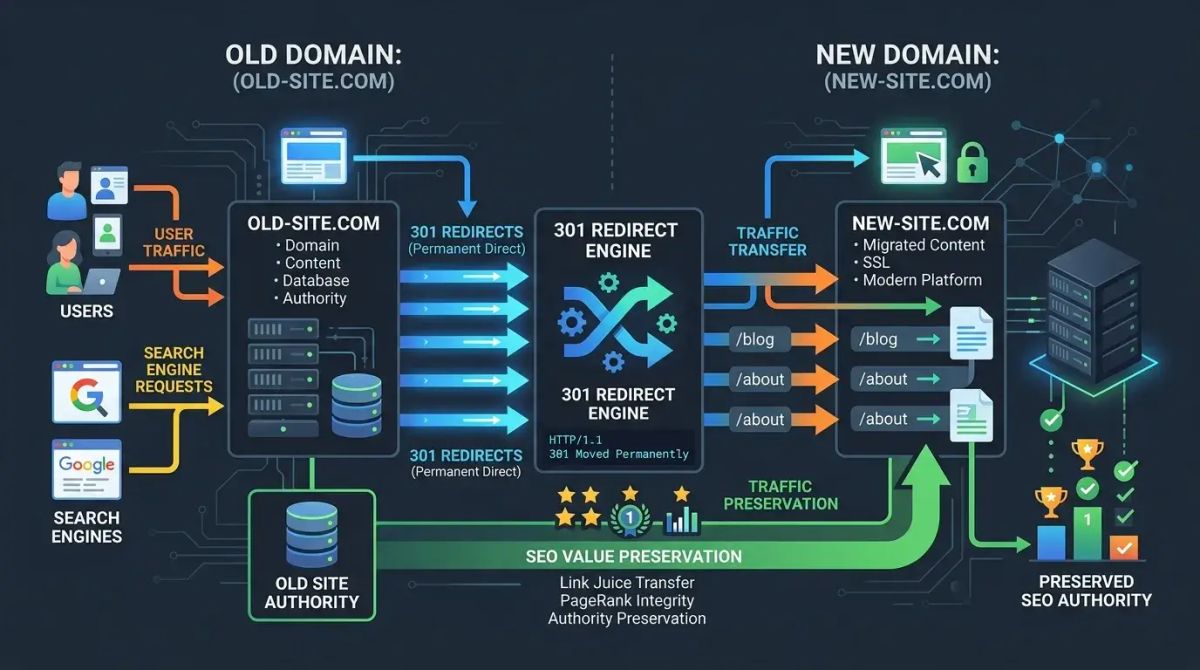
Moving from one domain to another is one of the highest-risk migration types. This typically happens during rebranding, acquisitions, or consolidation of brand properties. Search engines need time to recognize the new domain and transfer the authority accumulated by the old domain. Without proper 301 redirects and Search Console notifications, you risk significant and prolonged traffic loss. The full authority transfer can take three to six months.
HTTP to HTTPS Migration
Adding an SSL certificate and moving from HTTP to HTTPS is relatively lower risk compared to other migration types. Google has confirmed HTTPS as a ranking signal, making this migration essentially mandatory for modern websites. However, mixed content errors, incorrect certificate configuration, and incomplete redirect implementation remain common pitfalls that can cause unnecessary ranking fluctuations.
CMS Change
Switching from one content management system to another, such as moving from WordPress to a headless CMS or from a legacy platform to a modern framework, introduces both content and technical risks. CMS changes almost always alter URL structures, template markup, internal linking patterns, and page load characteristics. Comprehensive URL mapping between the old and new CMS structures is essential.
URL Restructuring
Changing the URL structure of your existing site, such as removing date-based URLs, flattening category hierarchies, or changing URL slugs, requires careful redirect planning. Every changed URL needs a corresponding 301 redirect. This type of migration also typically affects your internal linking structure and breadcrumb navigation.
Site Redesign
A visual redesign with new templates and user interface changes carries lower SEO risk if URLs and content remain unchanged. However, most redesigns also involve structural changes to navigation, page layouts, and sometimes URL patterns. Additionally, redesigns frequently impact page load speed and Core Web Vitals metrics, which are direct ranking factors.
Site Merge or Consolidation
Combining multiple websites into a single domain is among the most complex migration types. It requires consolidating content, backlink profiles, and URL structures from multiple sources into one unified site. Duplicate content issues, authority dilution, and competing pages must be carefully managed throughout the process.
Pre-Migration SEO Audit and Baseline
The foundation of a successful site migration is thorough documentation of your current state. Without this baseline, you will have no way to measure what changed and what broke after the migration.
Document Current Traffic Metrics
Export your Google Analytics and Google Search Console data covering at least the last 12 months. Record organic traffic volumes by page, conversion rates, average ranking positions, click-through rates, and top-performing landing pages. Segment your data by device type, geographic region, and traffic source. These metrics will serve as your comparison baseline after the migration is complete.
Conduct a Technical SEO Audit
Use SEOctopus Technical SEO Audit to create a comprehensive snapshot of your site's current technical health. Run a full Crawl Analysis to document the crawlability status of every page. Record all existing 301 and 302 redirects, canonical tags, hreflang configurations, robots.txt directives, and XML sitemap contents. This audit creates a detailed map of everything that needs to be preserved during the migration.
Analyze Your Backlink Profile
Generate a complete inventory of all backlinks pointing to your site. Identify which pages receive the most backlinks and evaluate the quality and relevance of those links. This information is critical for prioritization during the URL mapping phase. Pages with the most valuable backlinks deserve the most careful redirect treatment because losing those links means losing the authority they pass.
Create a Content Inventory
Build a comprehensive spreadsheet listing every page on your site. Include the URL, page title, meta description, word count, monthly organic traffic, ranking keywords, and backlink count for each page. This inventory ensures no page is overlooked during the migration and helps you make informed decisions about which content to keep, update, consolidate, or remove.
Migration Planning Checklist
A thorough planning phase separates successful migrations from disastrous ones. Do not begin the actual migration until every item on this checklist is complete.
Timing Considerations
- Choose a date outside your peak traffic seasons
- Allow four to six weeks of preparation time before the migration date
- Schedule the migration for a weekday morning when your technical and SEO teams are fully available
- Avoid migrating near major algorithm update periods when possible
- Set a backup date for the migration in case issues arise during preparation
Technical Preparation
- Validate the new server or hosting infrastructure in a staging environment
- Complete SSL certificate configuration and testing
- Lower DNS TTL values in advance to speed up propagation
- Configure CDN settings for the new domain or URL structure
- Run load tests to confirm the new infrastructure can handle your traffic volume
SEO Preparation
- Complete the URL mapping spreadsheet with every old URL mapped to its new counterpart
- Write and test all 301 redirect rules in a staging environment
- Prepare the new XML sitemap containing only new URLs
- Update robots.txt for the new site structure
- Update all canonical tags to reference new URLs
- Update hreflang tags for all language and region variants
- Plan the update of all internal links to point directly to new URLs
URL Mapping and 301 Redirects
URL mapping is the single most critical step in the entire site migration process. Every old URL must be correctly mapped to the appropriate new URL and redirected with a 301 permanent redirect.
Building the URL Mapping Table
Using your content inventory as the foundation, create a URL mapping table with at minimum these columns: old URL, new URL, page type, monthly organic traffic, backlink count, and priority level. Assign priority levels based on traffic and backlink value. Your highest-value pages should receive the most careful attention and should be individually verified after the migration goes live.
Implementing 301 Redirects
A 301 redirect tells search engines that a page has permanently moved to a new address. This redirect type transfers the vast majority of the old page's link equity to the new URL. Never use 302 temporary redirects for permanent migrations because search engines will not transfer link equity and will continue to index the old URL.
Follow these principles when implementing your redirects:
- Map each old URL to the most relevant new URL with matching or similar content
- Never redirect all old URLs to the new homepage as Google treats this as a soft 404
- Avoid creating redirect chains where URL A redirects to B which redirects to C
- Test all redirect rules thoroughly in a staging environment before going live
- Use SEOctopus Redirect Checker to verify that every redirect is functioning correctly
Preserving Link Equity
Backlinks are among the most valuable SEO assets you accumulate over time. To preserve link equity during migration follow these steps:
- Prioritize one-to-one redirects for your highest backlinked pages
- Verify that backlinks to old URLs successfully reach the new URLs through the redirect
- Contact your most important backlink sources and request they update their links to the new URLs
- Check for and eliminate any redirect chains that could dilute link equity
- Monitor your backlink profile after migration to catch any broken link situations
Common Migration Mistakes That Kill Traffic
Understanding the most frequent migration errors helps you avoid the same traps that have cost other websites their organic traffic.
Incomplete 301 Redirects
The most common and most damaging mistake is failing to create redirects for every old URL. On large sites with thousands of pages, some URLs inevitably get missed. These pages return 404 errors and search engines remove them from the index along with all their ranking value. Use SEOctopus Crawl Analysis to systematically identify any 404 errors after migration and create the missing redirects immediately.
Using 302 Instead of 301 Redirects
A 302 redirect signals a temporary move. Search engines keep the old URL in their index and do not transfer link equity to the new URL. For any permanent migration, you must use 301 redirects. This is one of the simplest mistakes to make and one of the most costly because it silently prevents authority transfer.
Mass Redirecting to the Homepage
Redirecting all old URLs to the new homepage might seem like a quick solution but it is a serious mistake. Google treats blanket homepage redirects as soft 404 errors, meaning no link equity is transferred and the old pages effectively disappear from search results. Every old URL must be redirected to its most closely matching new content page.
Blocking Crawlers via Robots.txt
Accidentally configuring the new site's robots.txt file to block search engine crawlers is a surprisingly common mistake. This often happens when test environment settings carry over to production. Always verify your robots.txt file immediately after migration and confirm that all important sections of your site are accessible to search engine bots.
Leaving Noindex Tags in Place
Noindex tags added during the staging or development phase that are not removed before go-live prevent search engines from indexing your pages. Run a comprehensive crawl immediately after migration to verify that no pages carry noindex directives that should have been removed.
Not Updating Internal Links
Internal links that still point to old URLs create unnecessary redirect chains. While the redirects will eventually reach the correct page, each redirect in the chain introduces latency and can leak a small amount of link equity. Update all internal links to point directly to the new URLs to maintain a clean and efficient internal linking structure.
Making Content Changes Simultaneously
Making significant content changes at the same time as a technical migration makes it impossible to diagnose the source of any problems. If traffic drops after a combined migration and content overhaul, you cannot determine whether the issue stems from redirect problems or content changes. Keep these as separate projects with adequate time between them for performance stabilization.
Content Inventory and Audit
A thorough content audit before migration prevents content loss and presents an opportunity for content housekeeping.
Content Categorization
Classify all your content into four categories. First, high-value content that should be migrated as-is with exact URL mapping. Second, content that should be updated and improved during or shortly after the migration. Third, similar or overlapping content that should be consolidated into single stronger pages. Fourth, low-value or outdated content that should be removed with appropriate redirects to related content.
Duplicate Content Resolution
Identify and resolve duplicate content issues before the migration. If multiple URLs serve the same or very similar content, the migration is an excellent opportunity to consolidate them. Redirecting multiple weak pages to a single strong page can actually improve your post-migration SEO performance by concentrating authority.
Technical Considerations
The technical details of a site migration can make or break the outcome. Pay careful attention to each of these elements.
Canonical Tags
Verify that all canonical tags on the new site point to the correct new URLs. Canonical tags still referencing old URLs will confuse search engines and cause indexing problems. Use self-referencing canonical tags where each page's canonical points to its own URL as this is the safest and most unambiguous approach.
Hreflang Tags
If you operate a multilingual or multi-regional site, every hreflang tag must be updated across all language and regional variants. Remember that hreflang is bidirectional, meaning each variant must reference all other variants. Hreflang errors can cause the wrong language version to rank in specific markets, directly impacting your international SEO performance.
XML Sitemaps
Generate a fresh XML sitemap containing only the new URLs. Do not include old URLs in the new sitemap. Submit the new sitemap through Google Search Console and Bing Webmaster Tools. Remove or update the old sitemap to prevent search engines from attempting to crawl deprecated URLs.
Structured Data
Update all structured data markup to reflect the new URL structure. Any URL references within your Schema.org markup must be changed to the new addresses. After migration, validate your structured data using Google's Rich Results Test to confirm everything is functioning correctly.
Page Speed and Core Web Vitals
Measure the new site's page load speed and Core Web Vitals metrics before migration and compare them against your baseline. Ensure that LCP, INP, and CLS values have not degraded on the new site. Any decline in page speed metrics affects both user experience and search rankings.
Post-Migration Monitoring
Once the migration is complete, an intensive monitoring period begins. You should monitor daily for at least the first 30 days.
Google Search Console Monitoring
Take these steps in Google Search Console immediately after migration. Verify the new site property or update existing verification. Use the Change of Address tool to officially notify Google about a domain change. Submit the new XML sitemap. Check the Coverage report daily to track indexing status. Monitor crawl errors and immediately create 301 redirects for any 404 errors that appear.
Organic Traffic Monitoring
Compare organic traffic data in Google Analytics on a daily basis against your pre-migration baseline. Create comparison reports segmented by landing page, device type, and geographic region. Investigate any pages showing significant traffic drops immediately by checking their redirect status and indexing state.
Ranking Tracking
Monitor your target keyword rankings daily. Some temporary ranking fluctuations after migration are normal as search engines reprocess your content. However, sustained ranking drops lasting more than two weeks typically indicate a redirect or technical issue that needs immediate attention.
Crawl Error Monitoring
Use SEOctopus Crawl Analysis to regularly crawl your new site and identify issues. Look for 404 errors, redirect chains, redirect loops, and server errors. Fix any issues as quickly as possible. Daily crawling during the first week after migration is critical for catching and resolving problems before they cause lasting damage.
Recovery Timeline Expectations
Understanding the typical recovery timeline after a site migration helps you set appropriate expectations and avoid panic-driven decisions.
Short-Term Impact
During the first one to two weeks after migration, a 10 to 30 percent dip in organic traffic is normal. Search engines need time to discover, crawl, index, and evaluate your new URLs. During this period, remain patient and focus on monitoring your key metrics and quickly resolving any technical issues.
Medium-Term Recovery
With a well-executed migration, organic traffic typically returns to pre-migration levels within four to eight weeks. During this phase, search engines fully index the new URLs, complete the link equity transfer, and recalculate rankings based on the new site structure.
Long-Term Normalization
For large-scale migrations, full normalization can take three to six months. Domain changes in particular require extra time for branded queries to shift to the new domain and for users to build familiarity with the new address. If you are still experiencing significant traffic loss after six months, there is likely an unresolved technical issue that requires investigation.
Emergency Rollback Plan
Every site migration must include an emergency rollback plan. When something goes seriously wrong, you need the ability to quickly revert to your previous state.
Rollback Triggers
Define in advance which conditions will trigger a rollback. Examples include an organic traffic drop exceeding 50 percent within the first 48 hours, the new server becoming completely inaccessible, critical pages returning 404 errors that cannot be quickly resolved, or redirect loops that resist troubleshooting.
Rollback Steps
Your rollback plan should detail these steps: reverting DNS settings to point to the old server, reactivating the backup of the old site, reversing redirect rules, withdrawing the Change of Address notification in Search Console, and notifying all stakeholders about the reversion and the timeline for a reattempted migration.
Rollback Testing
Test the rollback scenario at least once in a staging environment before the actual migration. Measure how long the full rollback takes and document this timeline. Do not proceed with the live migration until you have successfully completed a rollback test.
Frequently Asked Questions
Is traffic loss inevitable during a site migration?
Some short-term traffic fluctuation occurs in almost every migration. However, the severity depends entirely on your preparation and execution quality. With thorough planning, complete 301 redirects, and careful monitoring, traffic loss can be limited to 10 to 20 percent and typically recovers within four to eight weeks.
Which is riskier, a domain change or URL restructuring?
A domain change is generally riskier because search engines need significant time to fully recognize the new domain and transfer accumulated authority. URL restructuring on the same domain benefits from faster authority transfer since the domain itself retains its established trust signals. Both scenarios absolutely require proper 301 redirects.
How long should we keep 301 redirects active?
Keep 301 redirects active for a minimum of one year. Ideally, maintain them indefinitely because external links pointing to old URLs can continue to send traffic and pass authority for years after the migration. Removing redirects means losing the link equity from all external links that still reference old URLs.
Can we change the CMS and domain at the same time?
While technically possible, this is strongly discouraged. Making multiple major changes simultaneously makes it extremely difficult to identify the source of any problems. Complete one migration, wait for performance to stabilize, and then undertake the second change. This staged approach significantly reduces risk.
Should we make content changes during the migration?
No, avoid content changes during the migration. Keeping content and technical changes separate makes troubleshooting much easier. Complete the migration first, wait for performance to stabilize, and then address content improvements as a separate project.
When can we decommission the old site?
Keep the old site accessible with redirects in place for at least six months. During this period, monitor whether search engines have fully indexed the new site and whether all redirects are functioning correctly. Before decommissioning, ensure all redirect rules are configured at the server level so they persist independently of the old site's application layer.
How do we use the Change of Address tool in Google Search Console?
Navigate to your old site's property in Google Search Console. Go to Settings and select the Change of Address tool. Enter your new site URL and complete the verification steps. This tool directly informs Google about your migration and helps accelerate the re-indexing process. Ensure your 301 redirects are fully functional before using this tool.
Site migration is a complex and high-stakes operation, but with careful planning and disciplined execution it can be completed successfully. SEOctopus Technical SEO Audit, Crawl Analysis, and Redirect Checker features serve as your essential companions throughout every phase of this process. Remember that a rushed and unplanned migration can cause months or even years of traffic loss, while a well-planned migration can actually propel your site's SEO performance forward.