On-Page SEO Checklist 2026: The Complete Guide to Higher Rankings
On-Page SEO Checklist 2026: The Complete Guide to Higher Rankings
On-page SEO encompasses every optimization you make directly on your web pages to improve search engine rankings and attract organic traffic. Unlike off-page SEO, which relies on external signals like backlinks, on-page SEO is entirely within your control. This makes it the fastest area where you can implement changes and see measurable results. In 2026, search engines evaluate page content and user experience with unprecedented sophistication. Simple keyword placement is no longer sufficient. Modern on-page SEO requires a holistic approach that combines technical HTML signals, semantic content optimization, and exceptional user experience. This guide breaks down every aspect of on-page SEO and provides an actionable checklist you can apply to every page on your site.
What Is On-Page SEO and Why Does It Matter?
On-page SEO is the practice of optimizing individual web pages to rank higher in search engine results pages (SERPs). It involves optimizing both the content visible to users and the HTML source code that search engines crawl. The goal is twofold: communicate the page's topic clearly to search engines and deliver an outstanding experience to visitors.
Google's 2026 algorithm evaluates on-page signals across three layers:
- Content relevance and quality — How thoroughly the page answers the search query and satisfies user intent
- Technical HTML signals — Title tags, meta descriptions, header hierarchy, schema markup, and canonical tags
- User experience metrics — Core Web Vitals, mobile usability, page speed, and interactivity
Pages that excel across all three layers consistently achieve top rankings. SEOctopus's On-Page SEO Checker automatically analyzes these three dimensions and delivers prioritized improvement recommendations for each page.
Title Tag Optimization
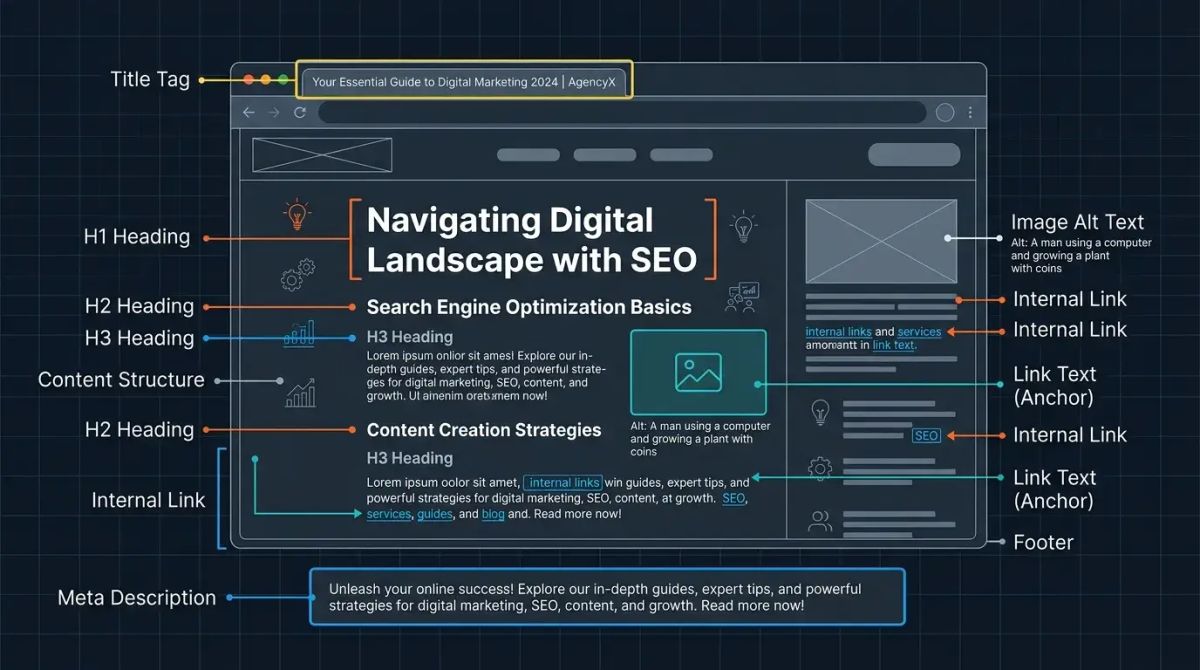
The title tag is the single most important on-page SEO element. It appears as the clickable headline in search results and directly influences both rankings and click-through rate (CTR).
Title Tag Best Practices
- Length: Keep titles between 50 and 60 characters. Google truncates titles that exceed approximately 600 pixels in width. Truncated titles look unprofessional and can reduce click-through rates.
- Keyword placement: Position your primary keyword near the beginning of the title. Search engines assign greater weight to words appearing earlier in the title. For example, "On-Page SEO Checklist for 2026" is more effective than "2026 Guide to On-Page SEO Techniques."
- Uniqueness: Every page must have a distinct title tag. Duplicate titles confuse search engines and make it harder for them to differentiate your pages.
- CTR-driven writing: Include numbers (2026, 15 Steps), power words (Complete, Proven, Ultimate), and parenthetical additions. A/B testing data shows that titles with brackets or parentheses achieve up to 40 percent higher CTR.
- Brand inclusion: Append your brand name at the end of the title using a pipe or dash separator. If your brand carries recognition, this boosts CTR.
Monitor your title tag performance through Google Search Console CTR data. SEOctopus identifies pages with low CTR and suggests title improvements based on competitive analysis.
Meta Description Optimization
The meta description is the summary text displayed below the title in search results. While not a direct ranking factor, it significantly influences CTR, which indirectly affects your ranking performance.
Meta Description Guidelines
- Length: Aim for 150 to 160 characters. Mobile devices may display shorter snippets, so place the most important information within the first 120 characters.
- Action-oriented language: Start with verbs like "Learn," "Discover," "Implement," or "Master" to encourage clicks.
- Keyword inclusion: When the search query matches words in the meta description, Google bolds those words, increasing visual prominence.
- Uniqueness: Write a custom meta description for every page. Never leave it blank. Google's auto-generated snippets are rarely optimal.
- Value proposition: Clearly state what the user will gain by visiting the page. Answer the implicit question: "Why should I click this?"
URL Structure and Optimization
Clean, descriptive URLs benefit both users and search engines. A well-structured URL communicates the page's content instantly and improves shareability.
URL Best Practices
- Short and descriptive: Limit URLs to 3 to 5 words. Long URLs lose readability and are harder to share on social media and messaging platforms.
- Include keywords: Incorporate the primary keyword in the URL. For example, /on-page-seo-checklist/ clearly signals the page's topic.
- Lowercase with hyphens: Use hyphens (-) to separate words. Avoid underscores (_) because Google treats hyphens as word separators but underscores as joiners.
- Avoid parameters: Prefer static, readable URLs over dynamic ones with query parameters (?id=123&ref=abc).
- Omit dates: Including years in URLs creates a maintenance burden when content is updated and risks losing existing backlinks if the URL changes.
Header Tags (H1-H6) Hierarchy
Header tags define the structural outline of your content for both users and search engines. A correct hierarchy improves content comprehension and SEO performance.
Header Tag Rules
- Single H1: Use exactly one H1 tag per page. The H1 defines the page's primary topic and should align closely with the title tag.
- Hierarchical structure: H2 tags mark main sections, H3 tags mark subsections, and H4 tags mark further subdivisions. Never skip levels, such as jumping from H2 directly to H4.
- Keyword distribution: Place the primary keyword in the H1, secondary keywords in H2 headings, and related terms in H3 headings. This distribution signals comprehensive topic coverage to search engines.
- Readability: Keep headings concise and descriptive. They serve as signposts that help users scan the page quickly and find the section they need.
- Avoid decorative use: Never use header tags solely for visual styling. Headers must reflect genuine content structure.
Content Optimization
Content is the heart of on-page SEO. Google's advanced natural language processing (NLP) capabilities now evaluate not just keyword presence but semantic meaning, topical depth, and alignment with user intent.
Keyword Strategy
- Primary keyword: Use the main keyword naturally 3 to 5 times throughout the content. Forced repetition (keyword stuffing) triggers algorithmic penalties.
- Semantic keywords: Include terms related to the main topic. If you are writing about "on-page SEO," naturally incorporate terms like "meta tags," "header tags," "content optimization," "page speed," and "internal linking."
- Long-tail keywords: Target specific search queries. Question-format keywords like "what is on-page SEO" are especially valuable for capturing Featured Snippets.
- Keyword density: A density of 1 to 2 percent is generally healthy. Rather than counting manually, use SEOctopus's On-Page SEO Checker to automatically analyze keyword distribution and receive alerts for overuse or underuse.
Content Quality Standards
- Comprehensiveness: Cover the topic thoroughly. Shallow content that leaves questions unanswered will not compete against in-depth resources.
- Originality: Produce genuinely unique content. Google's Helpful Content system identifies and demotes content that merely paraphrases existing sources without adding original value.
- Freshness: Update content regularly. In 2026, Google treats content freshness as a significant ranking signal, particularly for time-sensitive topics.
- E-E-A-T: Demonstrate Experience, Expertise, Authoritativeness, and Trustworthiness. Author bios, source citations, first-hand experience, and transparent methodology strengthen these signals.
Image Optimization
Images enrich the page experience but can severely impact page speed if not optimized. They also represent an SEO opportunity through proper alt text and file naming.
Image SEO Checklist
- Alt text: Write descriptive alt text for every image. The alt attribute should describe what the image shows in plain language and naturally include a relevant keyword where appropriate.
- File naming: Use descriptive file names. Replace generic names like IMG_20260115.jpg with on-page-seo-title-tag-example.webp.
- WebP format: The WebP image format delivers 25 to 35 percent smaller file sizes compared to JPEG and PNG while maintaining equivalent visual quality. All modern browsers support WebP.
- Lazy loading: Apply lazy loading to images below the fold. This dramatically improves initial page load time. Adding the loading="lazy" attribute to image tags is sufficient.
- Dimension attributes: Define width and height attributes for every image. This prevents layout shifts during page load and improves the Cumulative Layout Shift (CLS) metric.
- Responsive images: Use the srcset attribute to serve different image sizes for different screen widths, ensuring optimal performance on all devices.
Internal Linking Strategy
Internal links define the relationships between pages on your site and help search engines discover and crawl your content efficiently. An effective internal linking strategy distributes page authority throughout your site.
Internal Linking Principles
- Descriptive anchor text: Use contextual anchor text like "on-page SEO checklist" instead of generic phrases like "click here." Search engines use anchor text as a signal about the linked page's content.
- Relevance: Link only to genuinely related pages. Irrelevant internal links degrade user experience and dilute SEO signals.
- Reduce depth: Ensure important pages are reachable within three clicks from the homepage. If critical pages are buried deep, use internal links to shorten the path.
- Eliminate orphan pages: Verify that every page receives at least one internal link. Pages with no internal links (orphan pages) are difficult for search engines to discover. SEOctopus's Technical Health Score automatically detects orphan pages and broken internal links.
- Balanced distribution: Build a balanced internal link structure across your site rather than funneling all links to the homepage.
Schema Markup and Structured Data
Schema markup provides search engines with structured information about your page's content. Properly implemented schema can generate rich snippets in search results and substantially increase CTR.
Priority Schema Types
- Article: For blog posts and news content. Displays publication date, author information, and headline in search results.
- FAQ: For frequently asked questions. Questions appear as expandable accordions directly in search results, occupying significant SERP real estate.
- HowTo: For step-by-step guides. Displays step previews in search results.
- BreadcrumbList: Shows the page hierarchy. Creates a navigation path rich snippet in search results.
- LocalBusiness: For local businesses. Enhances visibility in Google Maps and local search results.
Implement schema markup in JSON-LD format. Google explicitly prefers JSON-LD over other formats such as Microdata and RDFa.
Page Speed and Core Web Vitals
Page speed is a critical factor for both user experience and rankings. Google's Core Web Vitals metrics remain an important ranking signal in 2026.
Core Web Vitals Metrics
- Largest Contentful Paint (LCP): Measures how quickly the largest content element loads. The target is under 2.5 seconds. Server response time, image optimization, and critical CSS management directly influence LCP.
- Interaction to Next Paint (INP): Measures responsiveness to user interactions. The target is under 200 milliseconds. Heavy JavaScript execution and long tasks negatively impact INP.
- Cumulative Layout Shift (CLS): Measures visual stability. The target is under 0.1. Unsized images, late-loading ads, and dynamically injected content increase CLS.
SEOctopus's Core Web Vitals monitoring feature continuously tracks these metrics across all your pages and alerts you when values exceed acceptable thresholds. It provides specific improvement recommendations for each metric.
Speed Improvement Techniques
- Server response time: Keep TTFB (Time to First Byte) under 200 milliseconds. Use a CDN and implement server-side caching.
- JavaScript optimization: Remove unused JavaScript and defer non-critical scripts using async or defer attributes.
- CSS optimization: Inline critical CSS and defer the rest to eliminate render-blocking resources.
- Browser caching: Configure cache-control headers correctly. Apply long cache durations to static assets like images, fonts, and CSS files.
Mobile-First Considerations
Google has used mobile-first indexing for all sites since 2023. This means Google primarily uses the mobile version of your content for indexing and ranking.
Mobile Optimization Checklist
- Responsive design: Use a flexible layout that adapts to all screen sizes. Prefer responsive design over separate mobile sites (m.site.com).
- Touch targets: Ensure buttons and links are at least 48 by 48 pixels. Touch targets placed too close together create frustrating user experiences.
- Font size: Use a minimum body font size of 16 pixels. Smaller text causes readability issues on mobile devices.
- Viewport configuration: Ensure the meta viewport tag is properly set: meta name="viewport" content="width=device-width, initial-scale=1".
- Interstitials: Avoid full-screen popups. Google penalizes intrusive interstitials that degrade the mobile user experience.
Content Freshness and Update Strategy
Content freshness is a meaningful ranking factor, particularly for time-sensitive topics. Regularly updated content signals to both users and search engines that your site is active and current.
Update Strategy
- Annual audit: Review all content at least once per year. Correct outdated information, update statistics, and refresh examples.
- Statistical updates: Keep data and statistics current. Citing old figures undermines your credibility and E-E-A-T signals.
- Expand scope: Add new sections, techniques, or strategies to existing content to increase its comprehensiveness.
- Meaningful updates: When updating the publication date, ensure substantive changes were actually made. Changing only the date without modifying content is considered manipulative.
User Experience Signals
Google evaluates user behavior data as part of its ranking algorithm. A high bounce rate and low dwell time suggest your content fails to meet user expectations.
Improving User Experience
- Reduce bounce rate: Place a clear value proposition above the fold. Users should feel confident they have arrived at the right page within the first three seconds.
- Increase dwell time: Use visuals, videos, infographics, and interactive elements to keep users engaged throughout the content.
- In-page navigation: For long-form content, provide a table of contents that allows users to jump directly to the section they need.
- Readability: Use short paragraphs, bullet points, bold text, and adequate white space. Dense walls of text drive users away.
Common On-Page SEO Mistakes
Awareness of the most frequent on-page SEO mistakes helps you avoid them proactively.
- Keyword stuffing: Repeating the target keyword excessively. Google treats this as manipulation and may apply penalties.
- Duplicate content: Publishing the same or highly similar content across multiple pages. Use canonical tags to designate the preferred version.
- Missing alt text: Failing to add alt attributes to images. This represents both an accessibility failure and a missed SEO opportunity.
- Broken links: Internal links returning 404 errors damage user experience and waste crawl budget.
- Slow page speed: Unoptimized images, excessive JavaScript, and poor server performance drive users away and hurt rankings.
- Mobile incompatibility: Pages that do not render or function properly on mobile devices lose rankings under mobile-first indexing.
- Header tag misuse: Using multiple H1 tags or skipping hierarchy levels confuses search engines about content structure.
- Thin content: Pages with very little content or no unique value. Google's Helpful Content system specifically targets these pages.
On-Page SEO Checklist (Apply Immediately)
Use this checklist for every new page or content update:
Title Tag:
- Between 50 and 60 characters
- Primary keyword near the beginning
- Unique and CTR-optimized
Meta Description:
- Between 150 and 160 characters
- Action-oriented language
- Includes target keyword
URL:
- Short, descriptive, and keyword-inclusive
- Lowercase with hyphen separators
Header Tags:
- Single H1 tag
- Correct hierarchy (H1 > H2 > H3)
- Keywords distributed across headers
Content:
- Minimum 1500 words for comprehensive topics
- Semantic keywords included naturally
- E-E-A-T signals present
- Current and accurate information
Images:
- Alt text on all images
- WebP format where possible
- Lazy loading enabled
- Width and height attributes defined
Internal Links:
- Descriptive anchor text to relevant pages
- No orphan pages
- No broken links
Schema Markup:
- Appropriate schema types implemented
- JSON-LD format
- Validated with Rich Results Test
Performance:
- LCP under 2.5 seconds
- INP under 200 milliseconds
- CLS under 0.1
Mobile:
- Responsive design
- Adequate touch target sizes
- Viewport properly configured
Apply this checklist systematically using SEOctopus's On-Page SEO Checker. The tool automatically scans your pages, identifies gaps, and delivers a prioritized improvement plan. Track your overall on-page health with the Technical Health Score metric.
Frequently Asked Questions
What is the difference between on-page SEO and off-page SEO?
On-page SEO covers all optimizations made directly on your web pages: title tags, meta descriptions, content quality, header tags, image optimization, internal linking, and page speed. Off-page SEO focuses on external signals: backlinks, social media mentions, brand searches, and third-party references. Both are essential for ranking success, but on-page SEO is the area entirely within your direct control, making it the logical starting point for any optimization effort.
Should the title tag and H1 tag be identical?
They should be different but target the same topic. The title tag appears in search results and should be written to maximize CTR. The H1 tag appears on the page itself and communicates the main topic to visitors. For example, the title tag might be "On-Page SEO Checklist 2026 | Complete Guide" while the H1 reads "On-Page SEO Checklist 2026: The Complete Guide to Higher Rankings." This approach lets you optimize each element for its specific context.
What should keyword density be in 2026?
Rather than targeting a specific keyword density, focus on creating natural, readable content. A density of 1 to 2 percent is generally considered healthy. More importantly, incorporate semantic keywords and related terms throughout the content naturally. SEOctopus's On-Page SEO Checker analyzes your keyword usage and alerts you to overuse or underuse, removing the guesswork from content optimization.
How do I measure Core Web Vitals?
You can measure Core Web Vitals using Google PageSpeed Insights, the Lighthouse panel in Chrome DevTools, the Core Web Vitals report in Google Search Console, and the web-vitals JavaScript library. SEOctopus's Core Web Vitals monitoring feature tracks LCP, INP, and CLS values for all your pages continuously and sends automatic notifications when metrics exceed acceptable thresholds.
How important is schema markup for rankings?
Schema markup is not a direct ranking factor, but it generates rich snippets that substantially increase click-through rates. Pages using FAQ schema occupy more SERP real estate and can achieve 20 to 30 percent higher CTR. Additionally, schema helps search engines understand your content structure more accurately, which indirectly improves ranking performance over time.
How long does it take to see on-page SEO results?
On-page SEO changes typically begin showing effects within 2 to 8 weeks after Google recrawls the page. Simple changes like title tags and meta descriptions tend to produce faster results, while comprehensive content overhauls may take longer. You can check your page's crawl frequency in Google Search Console and request recrawling through the URL Inspection tool. SEOctopus tracks ranking changes daily, allowing you to clearly monitor the impact of your optimizations.
Is it better to update existing content or create new content?
Both strategies are important, but updating existing content often delivers faster results. Pages that have already accumulated some authority and backlinks tend to experience quicker ranking improvements when refreshed. New content is necessary for targeting entirely new topics. The ideal approach balances regular updates to existing content with fresh content production for new keyword opportunities.